Test Video - Shot with My DIY Steadicam
Everything I know about building a
DIY steadicam is now is in this new
guide. Learn
how to get amazing cinematic video with this cool gadget that you can build using parts from your local hardware store.
If you don't like the material, no worries. I'll give your money back and you get to keep the guide.
Guaranteed!
 |
- Printable PDF document
- Instant Digital Download
- 60 Days Money Back Guarantee
- Prompt Refunds No Questions Asked
- One Time Payment/No BS
- 2 FREE Bonuses:
- How To Build a DIY Camera Slider
- 3 Ways To Get Clients as a Videographer (you'll be surprised to find out what the first method is...)
|
 |
---
-----
Since I'm no longer selling the DIY Highball steadicam, you may wanna check out these other camera stabilizers. Click on any picture.
Check out the stabilizers on
Amazon Canada,
Amazon.UK and
Amazon.DE.
-----
Update: There's a new article where you can learn how to build a
GoPro steadicam - it works with compacts and DSLRs as well. Watch the videos below to see my new glidecam design.
This article is part of a series that teaches you
how to make your DIY steadicam.
The pictures below and the above construction scheme show you how to make a gimbal for your DIY camera stabilizer. But as simple as it may look, the reality is it's a painstaking work that needs lots of attention to details if you want to get that smooth video footage.
Why am I saying this? Well, I wasn't able to get the steadicam to work properly with this gimbal design (which was inspired by YouTube user
realbugger - watch his clip below). What I mean is this: I didn't execute the work perfectly and I accumulated small errors here and there that ultimately made it impossible for me to
balance the glidecam...
I'm currently working on another design (I dropped the cube idea) which includes some machinery work (also a two piece top plate for placing the camera on - sliding in two directions for fine tune balancing).
The point is the cube and ball bearings gimbal work fine if you execute it right. Just as
realbugger shows you in his clip - even though he admits he went through
trial and error before reaching the final version.
How to make the gimbal
You need a
wooden cube and a drill with a
spade drill bit and a regular bit: the spade to drill holes for the bearings and the regular one to drill the gaps for the bolt heads and the hole for the threaded bar that goes through the cube.
I had the cube made by a friend of mine who runs a furniture business (he has the proper machinery for this kind of work,
lathe and all).
And I recommend you do the same -
look for a local workshop that can do it for you. They have special drilling machines where the piece is being held in a vise and the boring is much more precise. A specialized shop can usually do it better than you and as long as the cost is not prohibitive, you should give it a shot.
The cube has to be perfect in all aspects:
- each set of faces have to be parallel
- respect the 90 degree angle on each corner
- each hole must be perfectly centered on the face
- each pair of holes must perfectly aligned so that the skate bearings will be parallel and centered on an imaginary line that passes through them (see the infographic above)
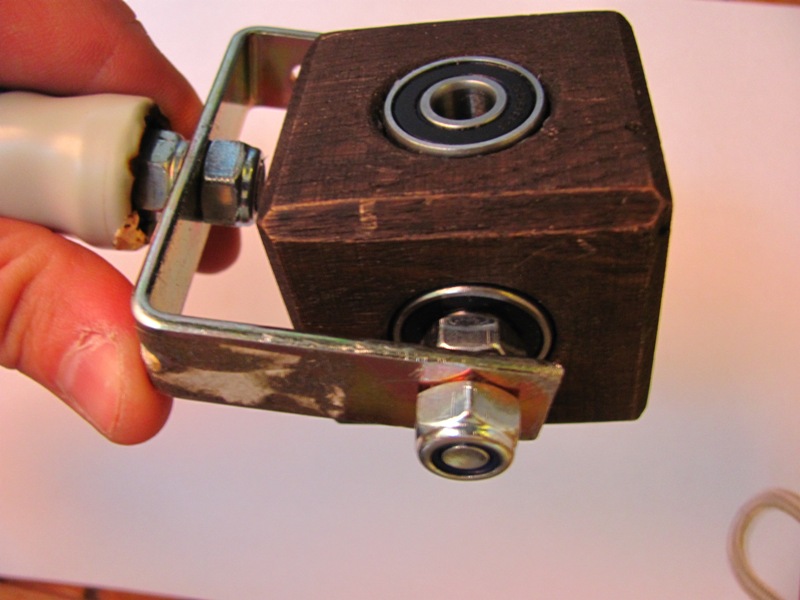
Pass a bolt through each of the bearings on which the gimbal handle will be attached. In my case, the gap wasn't large enough to accommodate the
bolt head so
I cut it off with a hack saw, leaving just a thin piece (see pic above).
Add a self locking nut on the bolt and tighten it. Now the bearing spins on the bolt. Add some
resin glue on the bearing and inside the hole and slide the bearing in the cube. Use a ruler to make sure the bearing is aligned with the surface of the cube.
Do the same with the rest of the bearings. One pair of bearings shouldn't have any bolts in - those will hold the main shaft of the whole rig. Let the glue harden over night.
Make a frame out of
flat stock for the handle. Drill it accordingly on the lateral ends to be placed on the gimbal. Also drill a hole for the handle.
Take a
PVC 90 degree elbow and
heat it above an open flame. Force the bearing in while the pipe is still malleable. Bent the margins as to hold the bearing inside - let it cool down and you're done! Don't forget to prepare the bearing beforehand (slide in on a bolt and add a locking nut).
Assemble the gimbal and you're good to go.
Now just add the main shaft along with the upper and lower weight plates and you've got yourself a new stabilizer. That's the easy part - the hard part is
shooting and editing interesting videos. :-)
Add
duct tape on the bar for a
close fit. I used
8 mm thick threaded bar (50 cm long) and
bearings with 22 mm exterior diameter and 8 mm interior diameter.
You don't wanna tighten the bearings too much on the threaded rod. Actually
leave a tiny gap between the bearing and the two nuts tighten against each other that act as a stopper. This grants a free spin of the bearing.
You can also use locking nuts to hold the gimbal in place but the thing is it's hard to thread a locking nut 20 cm on the bar. If you want to move the gimbal higher or lower on your rig (depending on the camera you're using) it's easier to loosen the nuts and then spin then by hand (you need pliers to hold the rod if you wanna do that with the locking nut).
Notice my previous
DIY gimbal in the background. The main advantage with it is that it "auto" adjusts since it has 3 concentric PVC rings - you can't go wrong with it.
However, professional camera stabilizers have a
3 axis gimbal where the
movement on each axis is done via a ball bearing which means everything is much smoother. That's the goal you want to accomplish with this design (and with the one I'll be releasing soon).
And there you have it - a DIY glidecam to shoot
movie like scenes that'll impress your friends. You'll also get tons of attention whenever you're out shooting videos (people coming to you asking
What's that?) :-)
See the full batch of pictures with my project
here.
Why this didn't work for me
Firstly, I didn't ask my friend to drill the wooden cube as I show you in the infographic above (see top of this post). So
each hole was deeper than it should have been.
Because of that, my bearings weren't exactly resting on anything. They were only touching the lateral walls of the bore so my only solution for fixing them was to add the resin glue.
I tried to have them parallel with the faces of the cube but
what if each set of faces weren't parallel? Or what if each pair of holes wasn't perfectly aligned nor diametrically opposed? Maybe there were small imperfections in the cube itself which led to other minor imperfections in placing the bearings which also cumulated with...
Bad placement of bearing in PVC pipe handle. The bolt sticking out of the bearing was sightly tilted, which means the bearing was tilted within the PVC handle, etc.
I should mention
the metal frame of the handle was imperfect as well. There was
more weight on one arm which also caused imbalance and the bends were incorrect: one arm was lower than the other.
The two arms weren't within the same mathematical plane.
The funny part was I only became aware of all these issues after I assembled the stabilizer and tried to balance it for more than two hours without any success.
Conclusion
At this point I'm pursuing another design but I may come back to the cube since it's kinda cute and easy to implement. And now I know what I did wrong so that's a valuable lesson about physics and the principles behind this type of gimbal.
I'll be experimenting with custom manufactured pieces coz I want to achieve the best performance possible. Mostly I'm curious if that's the key to perfect balance and optimal work flow when actually shooting video.
Over to you
- Did you build a camera stabilizer?
- Do you think it's worth the effort?
- What other tips can you suggest for a minimalist DIY steadicam design with maximum functionality?http://www.highballblog.com/2011/07/how-to-edit-gopro.html